Campaigns
Campaigns are at the core of Broadcast's newsletter system. Each campaign represents a connection between your blog's RSS feed and a group of subscribers, automatically sending new posts as newsletters.
Understanding Campaigns
A campaign consists of three main elements:
- An RSS feed source (your blog)
- A subscriber list
- Sending settings and customization options
When you create a campaign, Broadcast will automatically:
- Monitor your RSS feed for new posts
- Convert new posts into newsletters
- Send them to your subscribers according to your schedule
Managing Campaigns
Campaign List
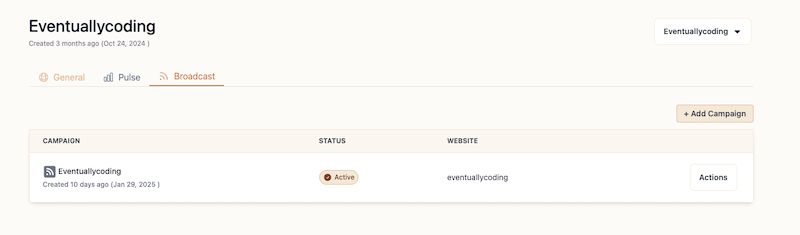
The campaigns page shows you all your active campaigns with key information:
- Campaign name
- Status (Active/Inactive)
- Associated website
- Action menu for managing each campaign
Creating a Campaign
To create a new campaign, click the "+ Add Campaign" button in the top right corner. You'll need to configure the following settings:
| Setting | Description |
|---|---|
| Name | The campaign name that will appear in email subjects and footers |
| Feed URL | Your blog's RSS feed URL |
| Website | The associated website for the campaign |
| Schedule | Email sending frequency (hourly, daily, or weekly) |
| Socials (optional) | Social media links to include in the email footer |
Campaign Status
Each campaign can be:
- Active: The campaign is running and will send newsletters
- Inactive: The campaign is paused and won't send newsletters
You can change a campaign's status at any time through the Actions menu.
Testing Your Campaign
Before activating a campaign, you can send test emails to verify everything works as expected:
- Test emails use your latest blog post as content
- You can send tests both when creating and editing a campaign
- Test emails are sent to your account's email address
- This allows you to check the layout, formatting, and content rendering
Email example
You can customize the email that your subscribers will receive. Check out the email documentation for more information.
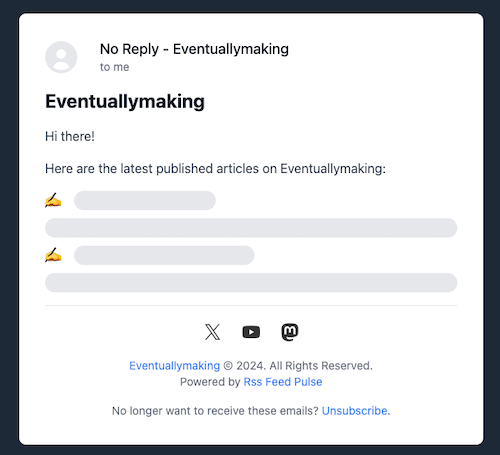
Here is an example of the default email that your subscribers will receive:
Email Customization
Each campaign uses an email template that determines how your newsletters will look. You can:
- Customize the email design
- Add your branding
- Modify the layout
- Include social media links
Learn more about email customization →
Campaign Analytics
All links in your campaign emails automatically include UTM parameters for tracking. The standard UTM format is:
?utm_source=newsletter&utm_medium=email&utm_campaign=[campaign_name]
This allows you to:
- Track newsletter performance in your analytics tool
- Measure engagement with specific posts
- Understand which content resonates with your subscribers
Best Practices
- Campaign Names: Use clear, descriptive names that help you identify the purpose of each campaign
- RSS Feed: Verify your feed URL is valid and includes all necessary content
- Scheduling: Choose a frequency that matches your posting rhythm
- Testing: Send a test email to check how your newsletters look before activating the campaign