Emails customization
You can customize the e-mail template that will be sent to your subscribers when a new blog post is published, or you can use the default template.
Here is an example of a custom email template made with MJML:
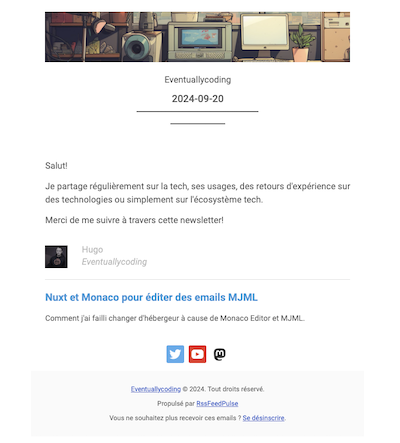
MJML syntax
The templating system is based on the MJML syntax. More information on MJML syntax can be found in the MJML documentation and you can use the MJML live editor to test your template. It is possible to start from pre-built templates and adapt them to your needs.
Mustache syntax
MJML templates can be customized with variables. Variables are replaced by their values when the email is sent. You can use the Mustache syntax to manipulate variables in your template. Look at the default email template to see how variables are used.
HTML content in descriptions
Why do I see raw HTML tags in my emails?
Some RSS feeds include HTML formatting in their article descriptions (bold text, links, images, paragraphs...). By default, the template displays this HTML as plain text for security reasons, which results in visible tags like <p>, <strong>, or <a href="..."> in your emails.
Example of the issue:
Instead of seeing:
Breaking news: Check out our new feature!
You might see:
<strong>Breaking news:</strong> Check out our <a href="...">new feature</a>!
How to fix it
You have three options:
- Modify your RSS feed to include only plain text excerpts instead of HTML content
- Edit your email template to render HTML properly (requires a plan with template customization)
- Remove the description from your template and keep only the article title and link
If you choose option 2, change your template from:
<mj-text mj-class="paragraph">{{description}}</mj-text>
To:
<mj-text mj-class="paragraph">{{{description}}}</mj-text>
The triple braces {{{ }}} tell the template engine to render HTML instead of escaping it.
⚠️ Important: HTML content from RSS feeds may not render consistently across all email clients (Gmail, Outlook, Apple Mail...). Complex layouts, custom fonts, or advanced CSS might display differently or not at all. For best results, keep your RSS descriptions simple.
Available variables
| NAME | DEFINITION |
|---|---|
| currentDate | The current date in the format YYYY-MM-DD |
| currentYear | The current year |
| newsletter.name | The name of the newsletter (the name of the campaign) |
| newsletter.url | The URL of the newsletter (the URL of the campaign) |
| newsletter.unsubscribe | The URL to unsubscribe from the newsletter (it is mandatory to include this link in the email) |
| articles | The list of the last articles published on the blog |
| articlesn.title | The title of the article |
| articlesn.description | The description of the article |
| articlesn.link | The url of the article |
| articlesn.thumbnail | The thumbnail url of the article |
| articlesn.publishedDate | The publication date of the article |
| socials.* | The different (optional) social media accounts related to the campaign: socials.twitter socials.facebook socials.instagram socials.linkedin socials.mastodon socials.youtube |